



One of the first and most important lessons I learned building autonomous AI systems was that the best solution uses the least AI.
I’ve written before about keeping AI tasks narrowly scoped and using deterministic workflows wherever possible.
But a fixed workflow doesn’t work for everything. Some use cases are too variable or require more operator interaction. For these situations, there’s another application of the same principle: giving agents skills with deterministic tools.
Taking skills beyond text prompts
Many agent skills are simple markdown files with text instructions. But even with today’s advanced models, agents can ignore instructions in a lengthy text prompt or execute steps incorrectly.
However, skills can contain much more than text. You can also include MCP tools that invoke code or local scripts for the agent to execute.
And if you offload repeatable steps into code, you get multiple wins: simpler instructions are easier for the agent to follow, code-based steps are executed deterministically, and token use can fall substantially.
Two ways to combine code and AI
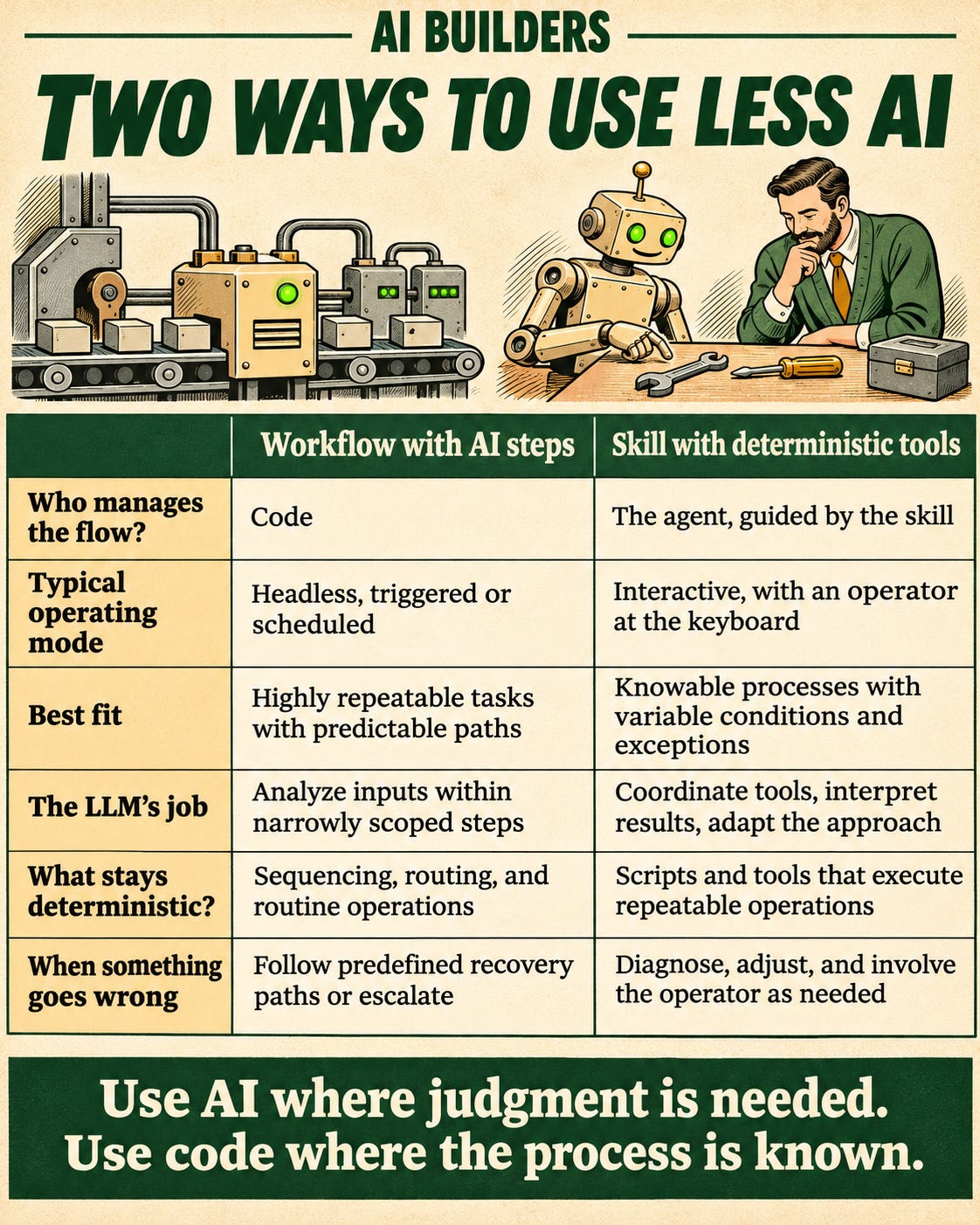
In a workflow with AI steps, the code remains in control and the AI executes narrowly-bounded pieces of the process.
Think of a Zap or n8n workflow, like one that fetches some text and then analyzes it with an LLM. Each step is deterministic except for the one part that requires an LLM’s unique capabilities.
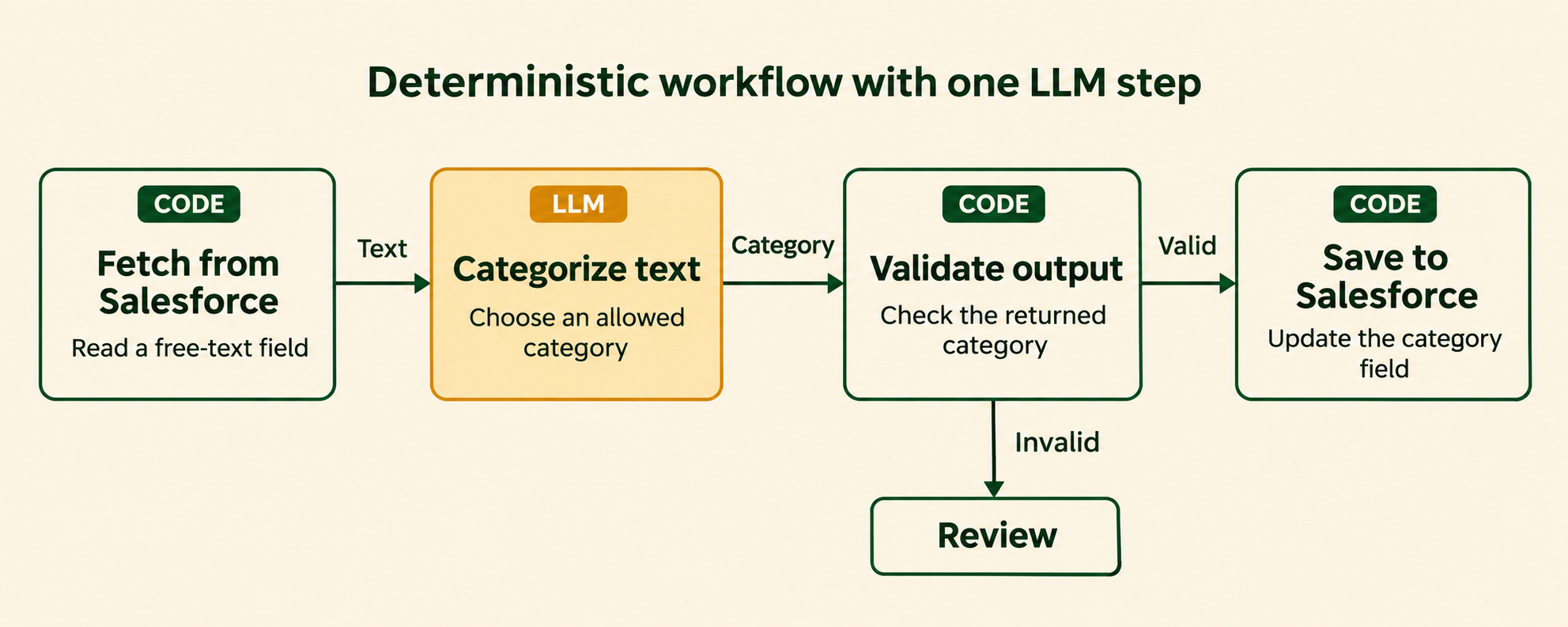
This works well when you have a very predictable process with a few known error scenarios and a bounded need for AI judgement.
Conversely, an agent with deterministic tools works well when a process is largely repeatable but still requires judgement and real-time human interaction during execution.
What’s different here is that the agent remains in control of the process and accesses a skill with tools that automate parts of it.
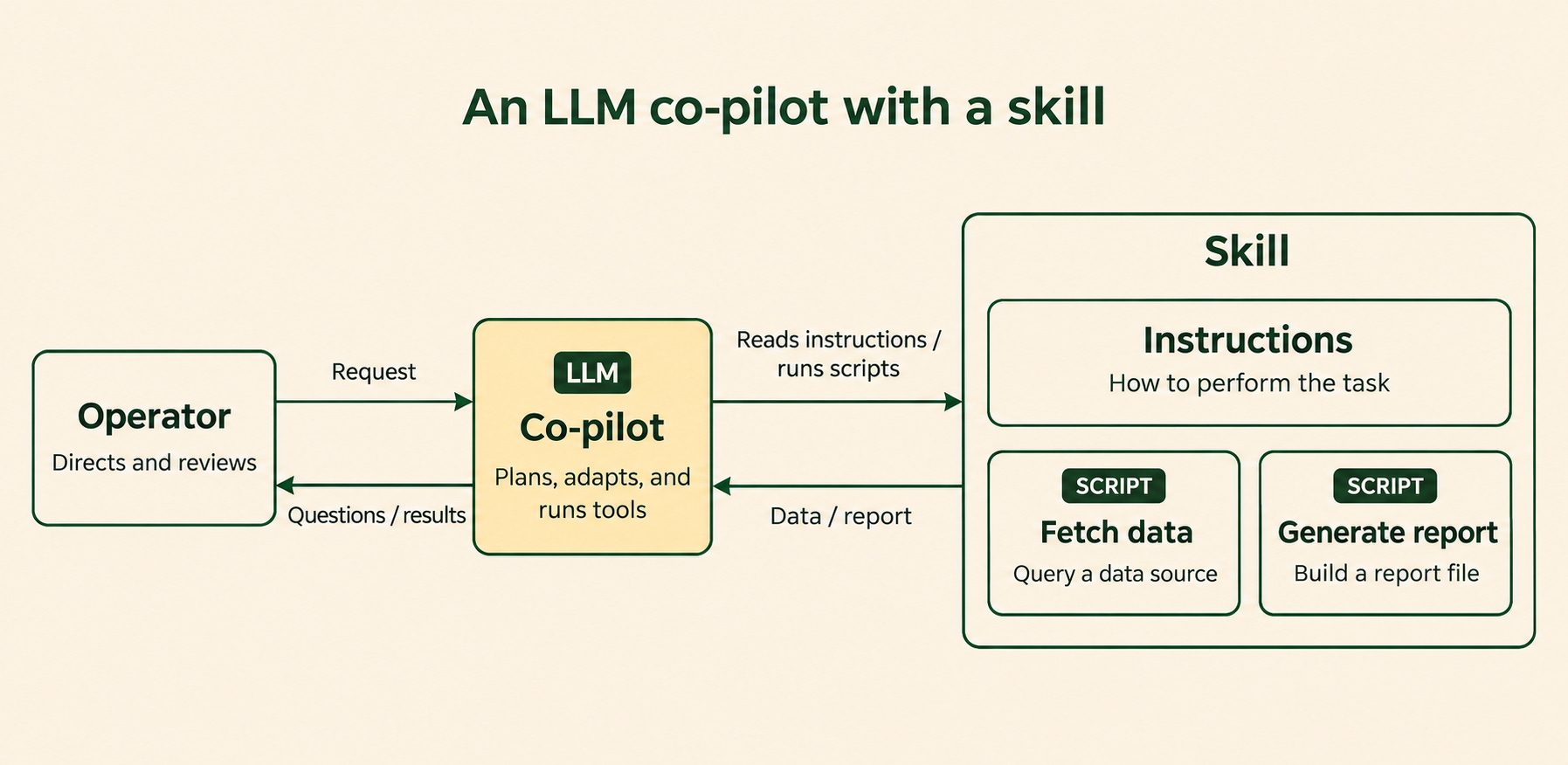
A workflow is a button you push (or that runs on a schedule). If something goes wrong, and the scenario isn’t explicitly handled, it comes back to you.
A deterministic tool inside an agent skill is a button the AGENT can push. If something goes wrong, the agent can re-evaluate, correct conditions that caused a failure, push it again, or escalate to the human.
The key benefit is that the agent owns an increasing share of the last mile. You get the reliability benefit of workflows with the judgement and resourcefulness of agents to get the job done.
Case study: a Claude plugin for Sales Ops reporting
Here’s a real-world example of this pattern in action. It saved one person two weeks per quarter - about 320 hours per year or ~17% of an FTE.
The business problem
A colleague in sales ops spent three weeks every quarter on performance reporting.
He supported a dozen different sales teams across four global markets and had three distinct reporting routines (monthly and quarterly team-level reporting + quarterly individual performance management). For each routine, he had to
pull performance metrics from a BI tool
add commentary and analysis
build assets like Confluence pages or slide decks (depending on the routine)
meet with sales leadership to review
These routines were critically important for the business’s operating rhythm and sales performance, but they consumed weeks of time from a senior resource and blocked strategic projects.
The automation challenge
This process was NOT a good candidate for the workflow pattern (a deterministic workflow with LLM steps).
Although the process was well-defined and repeatable, it had many possible edge cases, exceptions, and error paths.
For example: the sales team composition might change, underlying data issues needed to be identified, evaluated, and scrubbed before building, slides could be added or removed at the operator’s discretion, and so on.
An autonomous push-button workflow would either do only a small part of the job or would have been massively complex to build.
At the same time, writing down the analyst’s complex process in a lengthy prompt and handing it to an agent wouldn’t work well either. There are too many steps, and the possibility of hallucination in performance reporting was unacceptable. The operator would need to manually check every number every time.
What we needed was a solution that would automate 80% of the work with deterministic guarantees, handle exceptions and errors autonomously, and rely on the operator only for oversight, steering, and final human polish.
Solution design
I built a Claude plugin (distributed through the company’s internal marketplace) that the analyst could install.
Each of the reporting routines is a skill inside the plugin and accepts an analysis timeframe as an argument. So the analyst could invoke
/monthly-reporting 2026-10
to kick the process off.
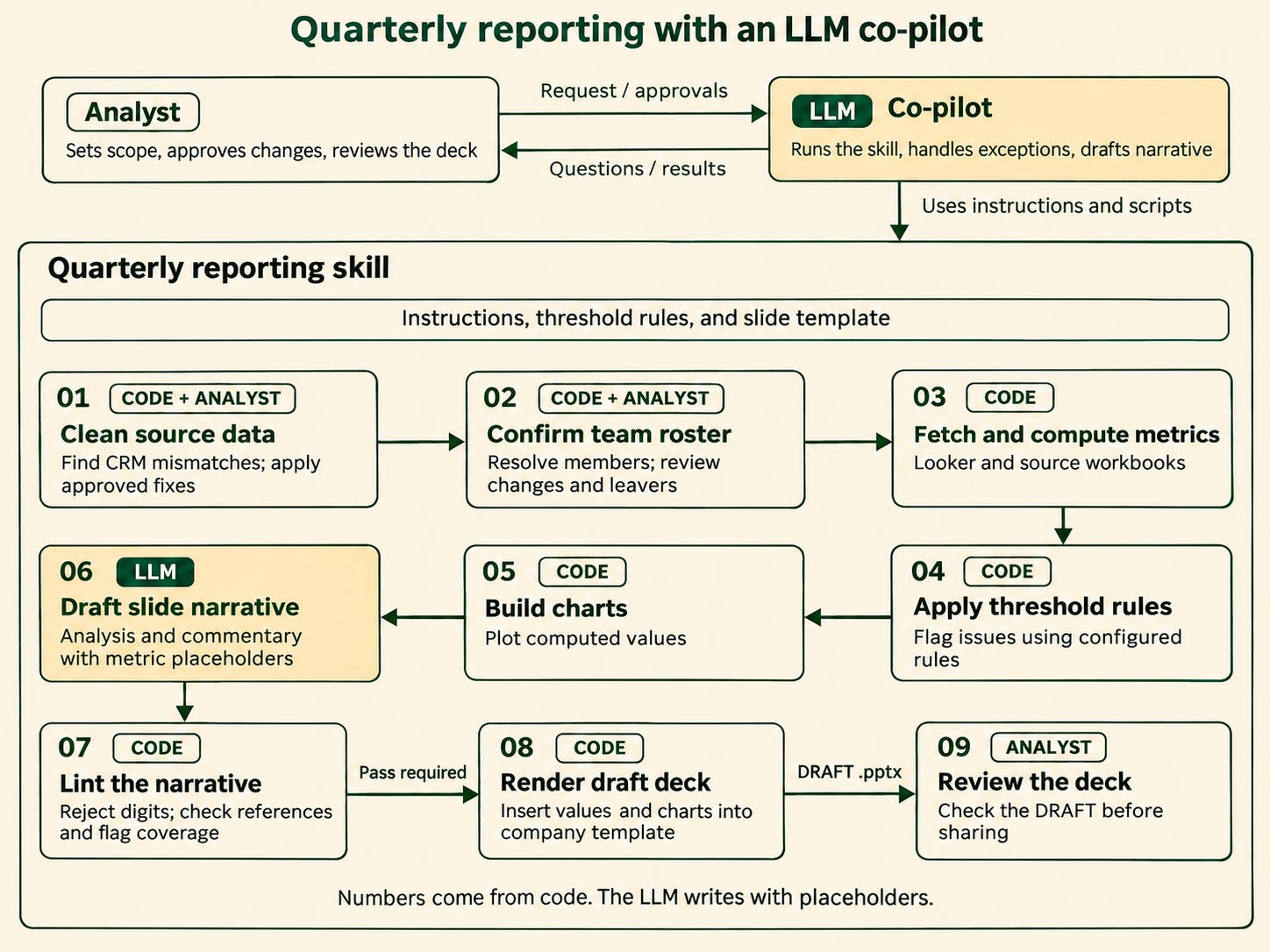
Each skill executed a runbook, with as much of the process as possible in code rather than a text prompt:
check and clean the data
fetch metrics from the BI tool via API
apply threshold rules to determine where commentary is needed
draft prose analysis with placeholders for metrics to be inserted
lint (code-based check) to ensure no LLM-generated numbers enter the prose
render the final artifacts (Confluence pages, slide decks) and insert numbers
publish for operator review
Each stage writes its output to a local run directory so it can be inspected, resumed, or partially re-run.
Key benefits
Metrics fetch from the source: Code pulls metrics from the same BI layer the analyst uses. This creates a clean contract, where any changes in metric definitions or filters are inherited automatically. The analyst or executive can also easily inspect the source dashboard and verify the number. This creates trust.
Declarative thresholds for analysis: Configurable, code-based thresholds identify where analysis is needed, and an LLM then writes the first draft. This helps the LLM apply the same principles that the human would. For example, a rule might specify that the LLM should only comment on conversion rate if it’s lower than x% of our target or always comment on bookings if more than y% of the forecast lands in the final third of the quarter.
The LLM never writes a number: Narrative prose includes typed placeholders instead of values. A lint gate blocks LLM-generated numbers and code inserts the correct values during artifact creation. This provides an effective guard against hallucination.
Data hygiene built in: The skill has a pre-run check inspecting every open opportunity and looking for common data hygiene issues that affect reporting. It buckets them, automatically updates the CRM when it can safely, and presents the rest to the operator for review.
Tips and gotchas
Here are a few tips and lessons learned that may help if you build something similar.
Don’t hardcode dynamic data into the plugin
Anything that might change should be pulled from external sources of truth, not hardcoded into the plugin. This includes quotas, sales team membership, metric definitions, and so on.
Treat individual performance commentary with caution
There can be personal and HR implications when commenting on individual performance. For these artifacts, the LLM only presents factual data and the lint checks for judgement words.
Backtest to a published example
When developing the system, Claude and I used an existing published artifact as a control. The LLM would run its script, compare the results to the manually created artifact, correct errors, and repeat until they matched exactly. This allowed the model to correct its own mistakes and surface ambiguities in business logic that required clarification.
Conclusion
This pattern has many applications. Any process that is “repeatable but messy,” with steps that are predictable but still require intermittent judgement, is a good candidate.
Any reporting workflow
Creating sales slides, QBR decks, or similar artifacts (templated but highly variable)
Quote preparation
Data migration / list preparation