



My previous article introduced the AI Skill Factory: a framework for discovering, validating, and scaling the best AI workflows across an organization.

This article is the practical companion, and it focuses on distribution and the quality controls around it.
I’ll explain how to create a plugin marketplace with Claude and build evaluation infrastructure to make sure the plugins work (and continue to work over time).
Although this walkthrough uses Claude, the same principles apply regardless of platform: centralize shared skills, make them easy to distribute and update, and use automated evals to verify behavior over time.
What are Claude Plugins?
If skills are atomic units of AI capability, plugins are molecules. They bundle multiple skills, MCPs, hooks, sub-agents, scripts, monitors, and other context into a single package.
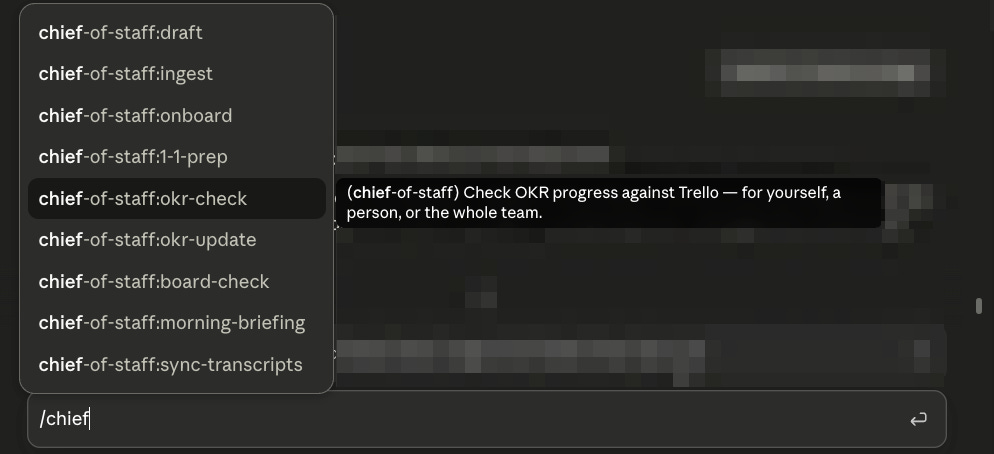
For example, I created a “Chief of Staff” plugin. It’s a suite of tools that all support the user (especially if they are people managers) in working more strategically. It helps them:
Conduct a morning briefing routine
Review the status of OKRs against actual task progress
Prep for 1-1s
Review open tasks on a Trello board
Draft a message in the user’s voice
Assess meeting notes and define next steps
etc.
I’ve found it helpful to think of plugins as discrete agent identities that can be adopted by the LLM in the session you’re working in.
For example, rather than invoking a “brand design” agent located on another server, you give your Claude session a “brand design agent” hat that it can put on. This gives the LLM all the tools and knowledge it needs to act in that capacity. Then it can take the hat off and continue with the next task.
This is actually very handy, as it allows you to maintain the flexibility and context of your current session while using pre-packaged skills.
Creating skills and plugins
Claude makes it easy to create skills, either starting from scratch or by converting local workflows. There’s even an Anthropic-provided plugin to help you build skills effectively.
When you’re ready to create a plugin or bundle existing skills for distribution, just drop in the plugin reference and ask Claude to build for you (start with Plan Mode).
The final directory structure might be simple or complex, depending on your use case. A complex plugin will look something like this (from the Claude docs):
enterprise-plugin/
├── .claude-plugin/           # Metadata directory (optional)
│   └── plugin.json             # plugin manifest
├── skills/                   # Skills
│   ├── code-reviewer/
│   │   └── SKILL.md
│   └── pdf-processor/
│       ├── SKILL.md
│       └── scripts/
├── commands/                 # Skills as flat .md files
│   ├── status.md
│   └── logs.md
├── agents/                   # Subagent definitions
│   ├── security-reviewer.md
│   ├── performance-tester.md
│   └── compliance-checker.md
├── output-styles/            # Output style definitions
│   └── terse.md
├── themes/                   # Color theme definitions
│   └── dracula.json
├── monitors/                 # Background monitor configurations
│   └── monitors.json
├── hooks/                    # Hook configurations
│   ├── hooks.json           # Main hook config
│   └── security-hooks.json  # Additional hooks
├── bin/                      # Plugin executables added to PATH
│   └── my-tool               # Invokable as bare command in Bash tool
├── settings.json            # Default settings for the plugin
├── .mcp.json                # MCP server definitions
├── .lsp.json                # LSP server configurations
├── scripts/                 # Hook and utility scripts
│   ├── security-scan.sh
│   ├── format-code.py
│   └── deploy.js
├── LICENSE                  # License file
└── CHANGELOG.md             # Version history
Overall, the process is simple, but you still need to plan and design your plugin carefully. Think of it like a product, where craft and taste matter.
Here are a few tips I’ve learned from trial and error:
Consider user experience first. The skills need to feel seamless and ergonomic to use. Avoid making multi-step workflows too rigid or inflexible. Test them as a user, and see what feels annoying or frustrating. Consider UX details like skill descriptions, which show up when you invoke the skill in a chat.
Make skills clear and mutually exclusive. Avoid the temptation to add too many, which can create confusion. Focus on a handful of clear skills that are easily distinguishable by humans and agents.
Consider when to use sub-agents. Your plugin can contain invokable sub-agents. A sub-agent has its own context window and is best for discrete tasks that can be cleanly delegated and that have a discrete, stand-alone deliverable. By default, skills execute in the main session with its existing context. If you explicitly set
context: fork, a skill can instead run in an isolated subagent.Consider cost optimization. Both skills and sub-agents allow you to pin a model, which may differ from the model of the parent session. For skills, that model is used for the turn. For sub-agents, it is used for all actions of that sub-agent. This can be a helpful way to reduce cost/usage, as you can pin a less complex task to a simpler model.
Run code reviews on your plugin files. Even if your skills are mostly markdown, review prompt instructions with the same rigor as code.
Run evals on your plugins to verify behavior. More on this below.
Distributing plugins
This is where the Anthropic ecosystem really shines.
Plugins can be distributed to Claude users via marketplaces, which are enabled by workspace admins. These can be global public marketplaces (Anthropic has an official one) or they can be marketplaces specific to your organization.
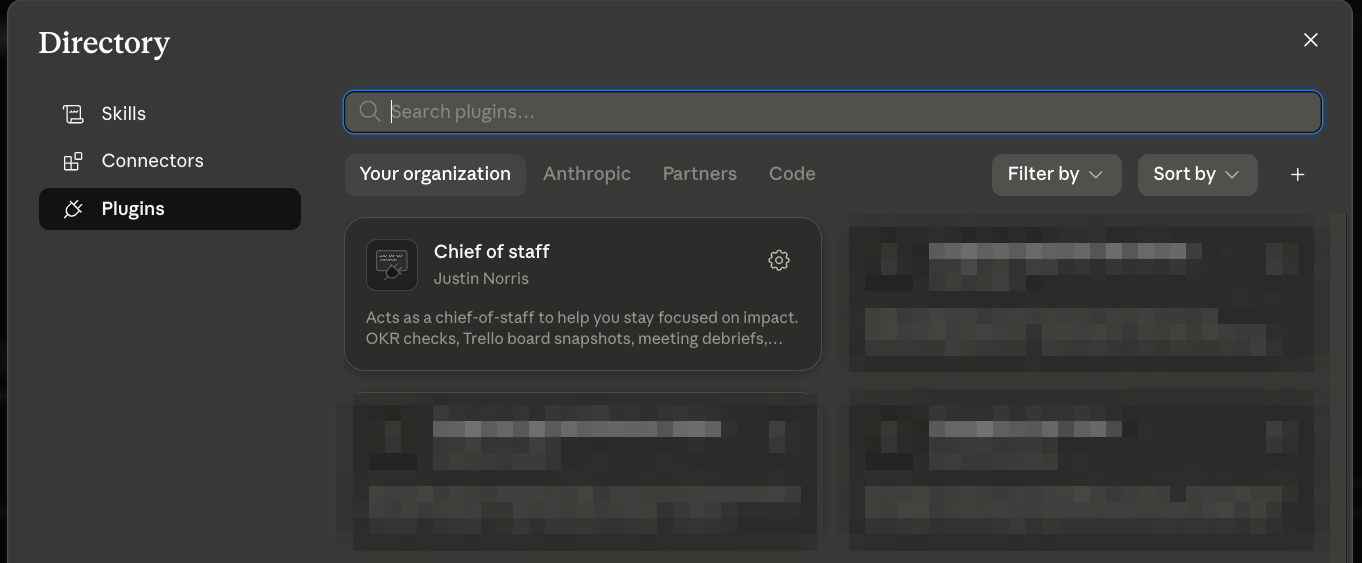
When you configure your private organizational marketplace, you can choose to upload plugins as .zip files or sync the marketplace with a Git repository. For core organizational plugins, a GitHub-synced marketplace is the stronger option: it gives you version control and reviewable changes.
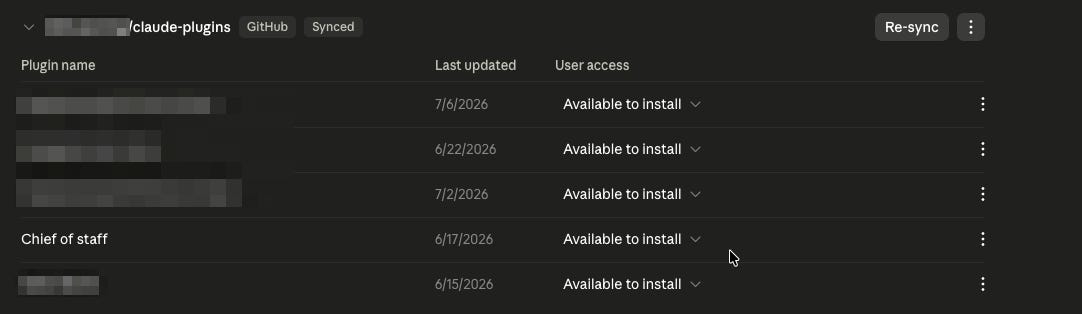
Owners can enable automatic syncing so that merging a pull request updates the marketplace; changes reach members on their next session or plugin refresh. It’s like Apple or Microsoft pushing an OS update to your machine. If your sales process changes, the plugin updates and all users follow the new process. If your brand guidelines change, all marketers have the new standards instantly.
Plugins also have a user access setting. They can be configured as:
hidden
available
installed by default
required, meaning users can’t uninstall them
Unfortunately there’s no role-based setting (or even any customizable roles!), unless you have the Enterprise Plan. On Team Plan, the setting applies to all users making it less than useful.
Evals
Evals are a well-established part of AI Engineering but don’t seem to be well-adopted when it comes to internal AI workflows.
Evals are regression tests designed to handle the probabilistic nature of LLMs. They answer:
Does the AI workflow reliably do what we claim it does, and did our latest change break anything that previously worked?
These tests can be fully automated (in some cases, using one LLM to evaluate the output of another), saving you time and increasing your development velocity.
Building an eval harness
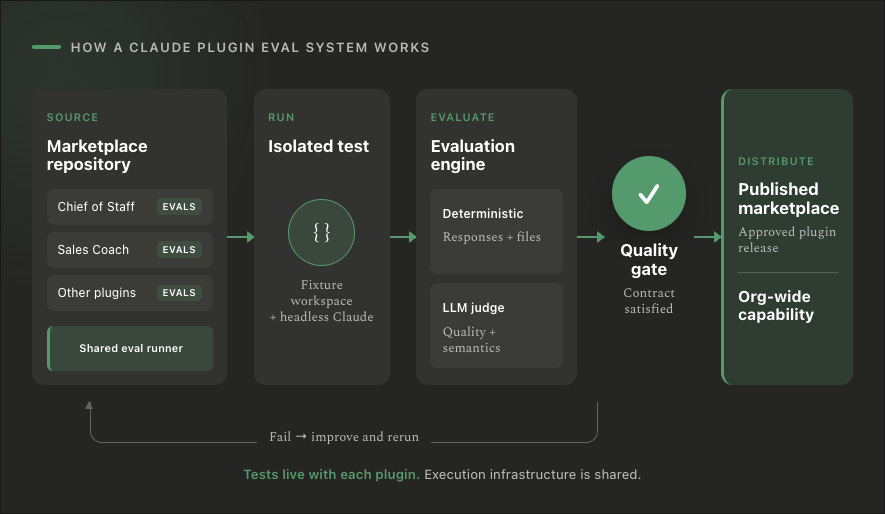
We already had a working eval protocol for our Dust agent repo, so I adapted the same basic pattern for Claude plugins and skills.
You can get started quickly with a vanilla version of the harness from this repo.
The system has three layers:
Tests written as data: JSON files describe inputs and expected behavior.
A shared runner: a Python script executes each test through Claude Code and evaluates the result.
A regression gate: every run produces a report that can be compared against a committed baseline.
The resulting structure looks like this:
tools/evals/
  run.py
  compare.py
  run.sh
  templates/

plugins/<team>/<plugin>/evals/
  suites/
  fixtures/
  baselines/
  out/
The eval harness itself lives in tools/evals/. It is contributor tooling, not part of any installable plugin.
The test definitions live beside the plugin they evaluate. This keeps the behavioral contract, fixtures, ownership, and release history together. If the plugin moves, its tests move with it.
Generated reports go into out/, which is ignored by Git. Baselines are committed so that future changes can be compared against a known-good version.
Tests are data
Each suite is a JSON file containing a collection of test cases.
A simplified test looks like this:
{
  "id": "draft_voice_from_self_md",
  "description": "Drafts should follow the voice rules in self.md",
  "tags": ["core"],
  "conversation": "new",
  "input": "/chief-of-staff:draft Write a Slack update for the leadership team",
  "assertions": [
    {
      "type": "contains",
      "value": "ELT"
    },
    {
      "type": "not_regex",
      "value": "(?i)synergy|leverage"
    },
    {
      "type": "not_contains",
      "value": "!"
    }
  ]
}
In this synthetic fixture, the user has explicitly said:
Call the leadership team “ELT.”
Never use “synergy” or “leverage.”
Don’t use exclamation points in Slack.
The test doesn’t require one exact response. That would be brittle and largely pointless when testing an LLM. It asserts the stable markers that must be present—or absent—for the response to satisfy the contract.
Running the plugin headlessly
The runner calls Claude Code in non-interactive mode:
claude -p "<test input>" \
  --plugin-dir <plugin path> \
  --permission-mode bypassPermissions \
  --output-format json
Claude returns a structured response containing the result and a session ID. The runner parses that response, evaluates the assertions, and records the outcome.
For multi-turn workflows, it passes the session ID back through --resume:
claude -p "<next message>" \
  --resume <session_id>
This lets us test workflows that require clarification, confirmation, or multiple steps.
For every new test conversation, the runner also creates a fresh temporary workspace. That workspace becomes Claude’s working directory for the test.
The high-level sequence (executed automatically by the runner) is:
Copy the selected fixture into a temporary directory.
Start Claude with the plugin loaded.
Send the test input.
Capture the response and session ID.
Inspect both the response and any files Claude changed.
Run the assertions.
Delete the workspace if the test passes.
Preserve it and print its location if the test fails.
Keeping failed workspaces is extremely useful. Instead of merely knowing that a file assertion failed, you can open the workspace and see exactly what Claude did.
Use synthetic fixtures
Many useful skills depend on local context: profile files, meeting transcripts, OKRs, stakeholder notes, CSV imports, or other documents.
Testing against your real workspace would be risky, difficult to reproduce, and liable to change underneath you. Instead, create a synthetic but realistic workspace specifically for evals.
For our chief-of-staff plugin, I created a fictional user:
Alex Rivera, Director of RevOps at Acme
The fixture contains:
A
CLAUDE.mdfilePersonal voice and working-style instructions
Current priorities
Stakeholder profiles
Team-member coaching notes
Current and previous-quarter OKRs
Synthetic meeting transcripts
CSV files representing potential imports
A record of which transcripts have already been ingested
The data is fake, but the relationships between the files are realistic.
For example, a team-member profile includes an unresolved commitment to deliver a pipeline-hygiene proposal. A later meeting transcript reveals that the same person is considering an internal transfer. That gives us enough context to test whether the skill can find and use the right information without relying on real employee data.
Each test normally receives a fresh copy of this workspace. Tests cannot accidentally contaminate one another.
The exception is a multi-turn group. Tests assigned to the same conversation group share both the Claude session and the temporary workspace, allowing us to test a complete workflow across several turns.
Test responses and side effects
Traditional chatbot evals often inspect only the final response. That isn’t enough for agentic workflows.
A skill may create a document, update a profile, append to a log, or modify an OKR file. The response can sound perfect while the underlying action is completely wrong.
Our runner therefore supports two categories of assertions.
Response assertions inspect what Claude says:
Contains or does not contain specific text
Contains any or all of several markers
Matches or avoids a regular expression
Stays within a word-count range
Uses quotations only when sources are present
File-effect assertions inspect what Claude actually did:
A file exists
A file does not exist
A file contains or excludes specific text
A file matches a regular expression
At least one file matching a safe relative glob satisfies the condition
Paths are constrained to the temporary workspace. Absolute paths and .. traversal are rejected.
That gives us a way to test contracts like:
The skill proposed a change but did not write it without confirmation.
The new OKR file was created in the expected location.
The previous-quarter file remained untouched.
An ingestion marker was appended rather than overwriting the existing log.
Sensitive information from a transcript was not silently added to a team profile.
Test confirmation flows as multiple turns
Confirmation requirements are particularly easy to test incorrectly.
Suppose the contract says that an OKR import must show the proposed result and ask for confirmation before writing anything.
A naive test might send the import request and immediately assert that the new file exists. That test would fail when the skill behaves correctly.
The correct test uses two turns.
Turn one:
Ask the skill to process the import.
Assert that it presents the proposed update.
Assert that it asks for confirmation.
Assert that the new file does not exist.
Turn two:
Reply, “Yes—write it.”
Resume the same Claude session.
Assert that the file now exists.
Assert that it follows the expected format.
Assert that the relevant links were preserved.
Assert that unrelated files were not modified.
This captures the whole behavioral contract, including the guardrail.
Mechanical assertions vs. LLM-as-judge
The default should always be the simplest deterministic assertion capable of proving the contract.
If a response must mention a specific record, check for that record. If the agent must not write a file, inspect the filesystem. If a response must acknowledge that Trello is unavailable, look for stable language indicating that state.
Mechanical assertions are cheap, transparent, and easy to debug.
But some behaviors are genuinely qualitative:
Did the draft sound like the user?
Was the coaching advice useful rather than generic?
Did the board summary distinguish work that is moving from work that is stalled?
Was the output a synthesis rather than a dump of raw records?
For those cases, the runner supports an llm_judge assertion. A second model receives the response and a narrow rubric, then returns a pass or fail verdict with a reason.
For example:
{
  "type": "llm_judge",
  "rubric": "The response should summarize which work is moving and which is stalled. It should not merely list every Trello card.",
  "model": "haiku",
  "advisory": true
}
The judge is an escape hatch, not the default.
Where possible, I still pair it with mechanical assertions. A board summary might need to contain the names of known fixture cards and pass a qualitative judgment about whether the synthesis is useful.
For subjective qualities like tone, the judge can also be advisory. Its verdict appears in the report but doesn’t block the release.
Start with the core behavioral contracts
Our first chief-of-staff suite contains 11 tests covering:
Basic plugin and CLI liveness
Drafting in the user’s documented voice
Graceful behavior when voice configuration is missing
Ingesting meeting notes without silently modifying sensitive profiles
A two-turn OKR confirmation and write flow
Refusing to import OKRs when required Trello links are absent
Graceful degradation when Trello is unavailable
Grounded 1:1 preparation using local team context
Live OKR and board checks against the Trello fixture
Not every possible workflow belongs in the first suite. Calendar-heavy, Google Drive-heavy, and today-relative behaviors are harder to make stable. Those can be added later to a broader behavioral suite.
The core smoke suite should remain relatively small: the handful of contracts that must not break.
Baselines turn tests into a regression gate
Once the suite passes, save the JSON report as a committed baseline.
After a change, run the suite again and compare the latest results with that baseline:
python3 tools/evals/compare.py \
  plugins/shared/chief-of-staff/evals/baselines/core_smoke_<label>.json \
  plugins/shared/chief-of-staff/evals/out/core_smoke_latest.json
The comparison fails if a test that previously passed now fails.
A deliberate behavior change may require a new baseline, but that should happen only after the change is understood, reviewed, and the entire suite is green.
Our promotion bar is therefore:
Every test in the required suite passes.
There are no unexplained regressions against the committed baseline.
A human reads the report and reviews the underlying change.
We are not running this in CI yet. In version one, the developer / Claude runs the suite locally and posts the generated Markdown report on the pull request:
gh pr comment <pr-number> \
  --body-file plugins/shared/chief-of-staff/evals/out/core_smoke_latest.md
That may sound less sophisticated than a fully automated pipeline, but it establishes the convention without requiring a large infrastructure project. Moving the same commands into CI, so that a passing test is required to merge a PR, is straightforward.
The tradeoffs
This setup is intentionally practical rather than perfect.
Each test starts a real Claude session, so the full suite consumes real usage (against your license or the API key provisioned in your Claude setup) and may take 15–30 minutes.
The runner also uses bypassPermissions, which means evaluated skills can execute tools without interactive approval. Temporary workspaces reduce the filesystem blast radius, but suites should run only from trusted repositories. External tools still require their own safety boundaries.
And an all-green suite does not prove that the skill is universally correct. It proves that the specific behavioral contracts we chose continue to hold under the conditions we tested.
That is still a major improvement over “I tried it a few times and it seemed fine.”
The goal is a repeatable system for detecting regressions, validating guardrails, and making shared AI capabilities safer to change.
Conclusion
Evals are a core part of professionalizing the internal AI stack. Just as mature Systems teams have automated QA and regression testing for Salesforce, Marketo, and other core systems, your agents should have automated evals to test their behavior.
This may seem like overkill for tooling you built for yourself. It becomes essential once that tooling is shared across hundreds of users. That’s when a useful local innovation becomes organizational infrastructure.
This post is fantastic. i’m going to have to bookmark, come back to it, and apply some of these learnings at work! Plugins are a great idea - I’ve been using a lot of skills and scheduled automations right now, so will definitely have to explore this more. And the evals section is helpful as well. Lots to test and learn from, thank you for sharing!