


Note from Justin: this is a guest post from Bastien, the Salesforce Architect on my team at 360Learning. It gives more detail on the AI-driven Salesforce development lifecycle we put in place. I think it’s one of the best things the team shipped. It works incredibly well and is a testament to the craft and ingenuity of Bastien and our Salesforce PM, Denis Kirchen.
I’ve been a Salesforce architect for many years now, but working on a small team, I found that much of my time kept getting pulled back into admin work: small, repetitive changes that ate hours and added little. It had to be done, and no one else in the company could take it over.
This quarter, I handed most of that to Claude. I reinvested the time I saved where it matters most for the team: designing how changes get made, cleaning up the org (permissions, about 75 unused Opportunity fields), and longer-term work, like creating Salesforce users straight from our HRIS or building the new Customer Journey path.
That’s one result of a quarter spent running our whole Salesforce change process with Claude, from the first request to production. In May, Justin described how the setup works. This post is what it produced, what we added along the way, and what we got wrong. Spoiler: nobody got replaced by AI agents.
The lifecycle, and where people decide
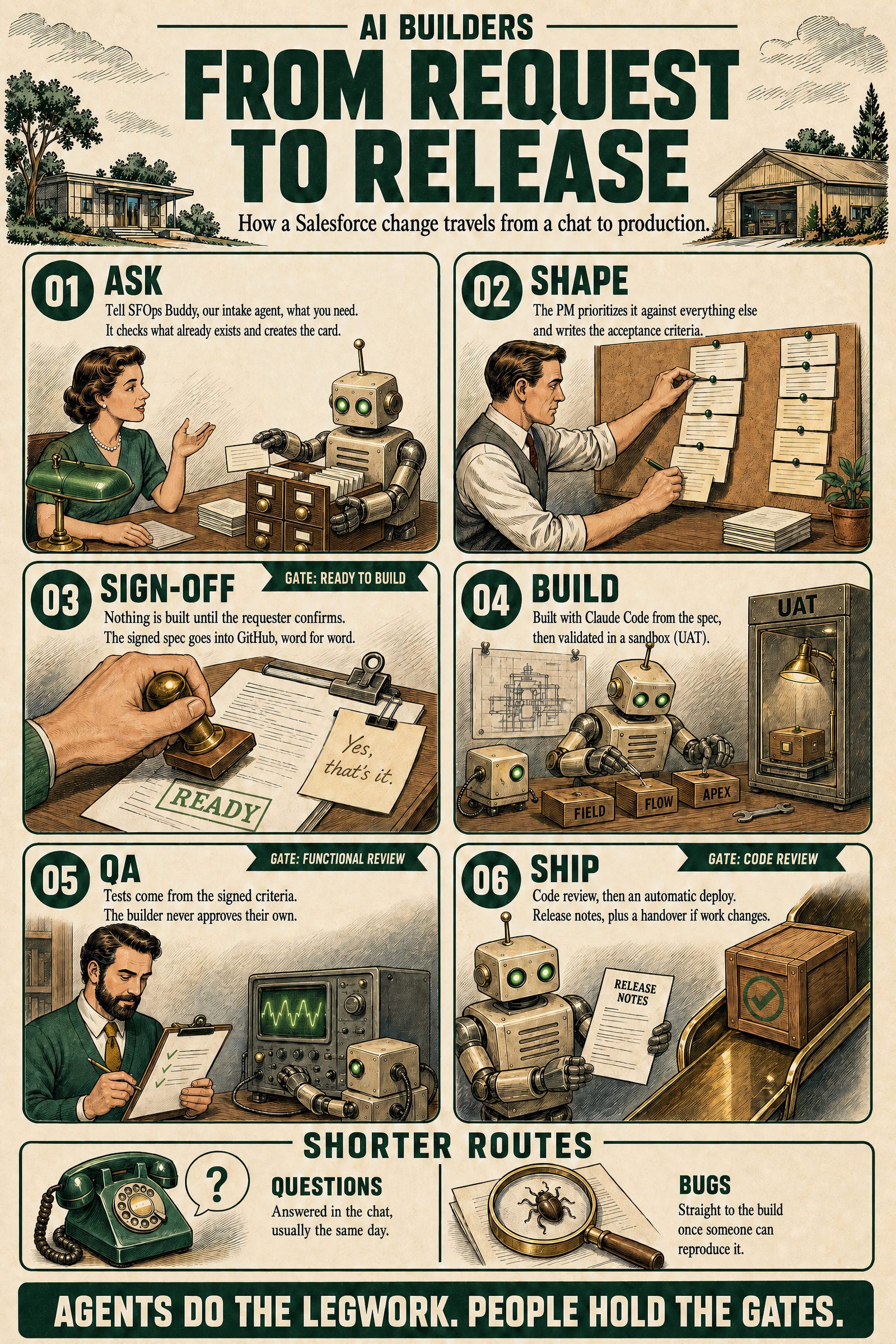
Every request now goes through the same five steps. Claude does the groundwork at each one, and a person makes the call.
Intake. Requests go to SFOps Buddy, an AI agent in Dust that we’re moving to Claude. It answers, pushes back, or qualifies the request with an impact score. Our PM sets the priority, guided by the agent’s assessment.
Spec. The spec and its acceptance criteria are drafted in business language. The business owner signs off on anything new, and that exact text is copied into a GitHub issue. No build starts without it: it’s the source of truth for the implementation.
Build. Claude writes the change following our written rules. Our pipeline, with GitHub Actions checks on every pull request, deploys it to a test environment.
QA. The signed criteria become a test book that runs in the test environment, and the results are committed to GitHub. Whoever built the change can’t approve its tests.
Ship. The pipeline deploys to production, and a monthly release note tells everyone who uses Salesforce what shipped: what changed, how, and which new features they can use.
Three things that made it work
We wrote the standard down. Our rules live in Markdown files in the repo, which the agent reads before every change: security mode on every query, how permissions are granted, how fields are documented, the deployment traps we’ve hit. A standard used to depend on someone remembering it. Now it’s applied every time.
The same files are where new lessons go. In September, a routine deploy quietly switched off the access policy that gives new sales hires their permissions. Salesforce doesn’t warn you. The rule and the fix were in the repo the same day, so no later change can repeat it.
The gates live in the pipeline, not in the prompt. My first article here ended on a lesson from Agentforce: build guardrails into code, not instructions. It turned out to apply to everything. A trial deploy against production runs our tests before anything merges. One check blocks a merge when production has drifted from the repo. Another blocks it when the builder wrote their own tests. If the agent forgets a rule, the pipeline still catches it.
People sit where there’s a real decision. We didn’t add sign-offs to mechanical steps. The business owner approves the acceptance criteria, because they know what done means. Someone who didn’t build the change approves the tests. As the team’s Salesforce architect, I review every pull request, metadata as well as code. Those are the three moments where a person adds something the model can’t. When I’m away, the team can still merge a defined, limited set of changes, so a change doesn’t wait for me.
How I learned to trust it
At first I was afraid of what Claude could get wrong. I think that’s the right instinct, and it’s why I built things the way I did.
When I want to automate a process, I start with a conversation: I walk Claude through everything I do, step by step, and we turn it into a Markdown file. I know that first version won’t be complete. So I dry-run it on a real case, and whenever something is missed or done wrong, I ask Claude to update the file, so its instructions cover that case next time. After two or three rounds, once it has run clean twice without me stepping in, it’s ready to hand to the team.
It isn’t bulletproof. But I still approve every pull request, so I catch what slips through, and each catch goes back into the files. The files keep getting better, and so does the trust.
A new way to build changes
We used to choose Flow whenever we could, because it was faster to build than code. Claude flipped that. It writes Apex and its tests in less time than it takes us to click a flow together, so code is now the quick option as well as the more capable one. We haven’t built a new flow since December 2025.
Code gives us what Flow does poorly: tests that run on every deploy, a diff a reviewer can read line by line, and more control at high volume. My first article had the example: our flow-based quote creation failed on more than half its runs with row-lock errors, and the Apex version fixed it. There’s a practical reason too. Flows are built by clicking, and their files aren’t meant to be edited by hand, so they’re a poor place for an agent to work. We still maintain the flows we have, and replace them when a change touches them.
Screens went the same way. A custom UI used to mean a screen flow. Now we build Lightning Web Components, which can do far more, and Claude is very good at them. We’ve shipped two so far:
Products & Pipeline shows what a customer owns and has in pipeline, on the account, opportunity, quote and contract pages.
The Customer Journey path shows each account’s stage and what’s needed to reach the next one, a richer version of the standard Path.
Claude writes the component and the Apex behind it, to the same rules as everything else. I own the design and the review.
Building is the cheap part now
When a build took days, we only built what had the highest return, and ideas from the field rarely made the cut. Now building is the cheap part. We try an idea, ship it to a small group of users in UAT or production, and change it the same day they react: they don’t like a part, it goes; they want another colour, done.
So the shift for us is to tell people what we can build now, and let the best ideas come to us. The trap is saying yes to everyone. Salesforce has to stay one tool the whole company relies on, not a patchwork of one-off requests.
The numbers after one quarter
These come from our project management tool and our GitHub history. Where a number has a catch, it sits next to it.
First answer to a request: about 20 minutes (median), against about 5 days for the first triage in 2025. We could only time the requests that were logged as tickets.
31% of requests went straight to build with no PM step: clear bugs, and features our own team raises, which Buddy specs.
126 acceptance tests on 17 changes. They stopped 5 defects before production in 10 weeks, 3 of them serious. One would have broken territory assignment on 97% of our accounts: set a rep on a French parent, and its German subsidiary moves too.
5 people ship changes instead of 1, about 72 a month through the pipeline in July and August.
One miss worth sharing: QA ran as an admin, and admins skip validation rules and field security, so some checks passed that shouldn’t have. Three defects still reached production; two needed a real user’s view to show up. We’ve started to build test logins for each type of user.
Our rules became our knowledge base
The files matter even more in a team of several developers and admins, where knowledge is scattered across people’s heads. When one of us has a question, we ask Claude, and it reads the files and our GitHub history to answer. We still keep a knowledge base for end users, on how to use Salesforce. But how it’s built now lives next to the code. Who wants to read a technical page when Claude can just explain it?
If you want to try this
Get the process right before you automate it. Walk the agent through it, dry-run it on real cases, and hand it to the team only once it runs clean.
If a rule matters, make the pipeline enforce it. Prompts drift. Checks don’t.
Measure from day one. We had no defect baseline from before, so we can’t prove the drop yet. We’re counting now.
Keep people for judgement. Three gates were enough for us. More would have been ceremony.
All in all, the goal is to make each of us more capable. Work goes faster, or at least Claude works on its own while I get on with something else. Quality goes up too: nobody remembers every best practice and every dependency on every change, and Claude does that far better than we do. A person still validates what comes out. When something drifts, we fix the instructions, so everyone who runs that workflow benefits next time, us included.
This is my half of the story. Denis, our PM, runs the intake side, with the agent that takes in and qualifies requests, and built our QA skill, and his half deserves its own post. If you run Salesforce ops and want to compare notes, I’m happy to.
